There is a well known Crash inside FL Studio that affects some Plugins regarding the Buffer size length.
To keep everything well synchronized we use fixed buffers in multiples of 8 like almost any other DAW handles the buffer size (like 64, 128, 256, 512, etc…)
FL Studio manages the buffers differently so maybe you will have a crash when using our TRIBE Core plugin for the first time, something like “EBusError – Bus Error or misaligned data access – main Thread” .
To Fix this issue you have to follow the next steps:
1. Load the TRIBE Core Plugin
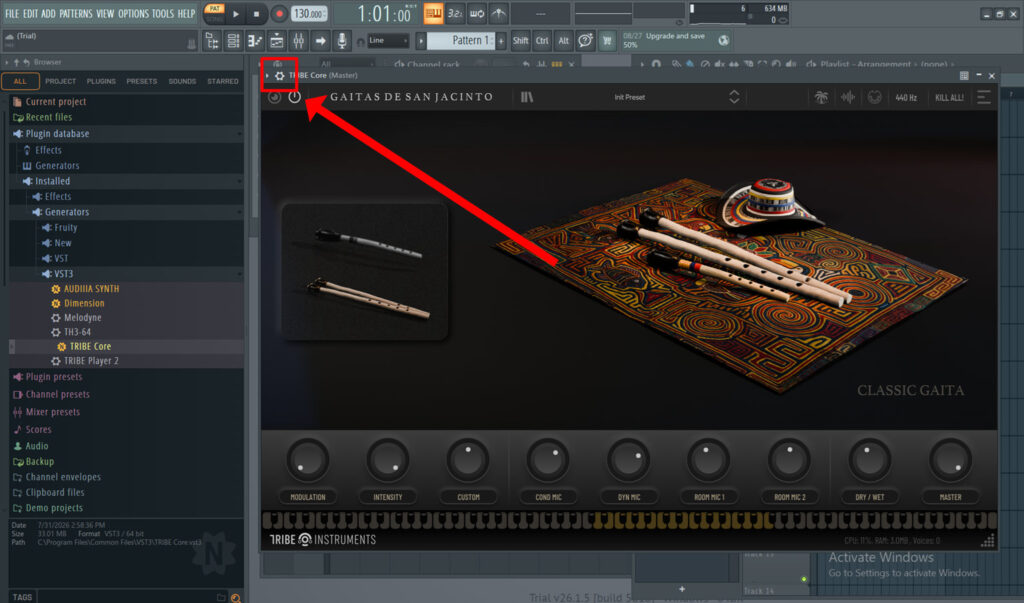
Load the TRIBE Core Plugin inside the Channel Rack of FL Studio. Dragging it from the Plugin Database.
2. Plugin Configuration
Click in the Plugin Configuration icon “Gear Wheel” that appears in the upper left corner of the Plugin window.
3. Check Use fixed buffers
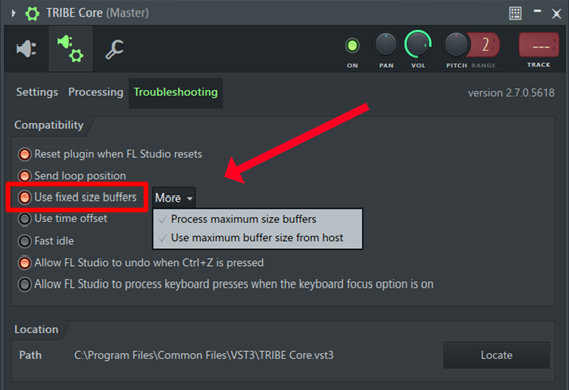
Click and Check the “Use fixed size buffers” icon to turn ON this options, also click in the more box and make sure that these two options are Checked.
Restart FL Studio
After doing this you can restart FL Studio and you won’t have this crashes anymore 🙂